How a Company Improved Its Oracle Cloud Backups with Commvault
A client running virtual servers on Oracle Cloud Infrastructure replaced its native backup tool with Commvault. It now centralizes management, integrates on-premises servers, and reduces storage costs through global deduplication.
The Scenario
Many organizations using Oracle Cloud Infrastructure (OCI) rely on native tools to protect their virtual servers. However, as their infrastructure grows or expands to include on-premises environments, limitations in visibility, retention, and scalability become apparent. This was the case for one of our clients, which decided to replace Oracle's backup tool with Commvault without changing its OCI infrastructure. The result: unified management, lower storage usage, and a more robust data protection strategy.
Learn more about how we work with Commvault in the AT Vault Commvault Cloud section.
The Project, End to End
The client had a fully operational architecture running on OCI, using Oracle's hypervisor and compute services. However, the native backup tool did not provide the flexibility or retention options its business required. The main challenges were:
- Difficulty managing policies and restores from a single dashboard.
- Lack of integration with physical servers in its data center.
- Growing storage usage due to the lack of global deduplication.
With Commvault Backup & Recovery, the company integrated all its Oracle Cloud data backups and its on-premises environment into a single console. Without modifying its cloud infrastructure, it gained full control over retention policies, granular recovery, and significantly reduced storage usage.
Why Migrate from Oracle Cloud's Native Tool
Although OCI's native tools offer basic Oracle Cloud data backup capabilities, many companies encounter limitations as their environments grow:
- Rigid retention policies with limited customization.
- Difficulty complying with security or audit requirements.
- Inability to integrate multiple environments, such as physical servers or additional clouds.
Commvault addresses these needs with an open, scalable, and vendor-agnostic platform capable of managing backups in any environment—without leaving Oracle Cloud infrastructure behind.
Practical Guide: Key Migration Steps
| Phase | Action | Outcome |
|---|---|---|
| 1. Initial assessment | Assessment of current OCI backups and definition of retention policies. | Identification of limitations and costs. |
| 2. Commvault implementation | Installation and configuration of Commvault agents for OCI. | Centralized management without modifying the environment. |
| 3. On-premises integration | Integration of physical servers into the same Commvault environment. | Hybrid management from a single platform. |
| 4. Unified deduplication enablement | Configuration of deduplicated storage. | Reduced storage usage. |
| 5. Continuous monitoring and optimization | Use of dashboards and automated reports. | Complete visibility and dynamic adjustments. |
Results Achieved
- 35 % reduction in storage usage through global deduplication.
- Centralized management of all backups (OCI + on-premises) from a single console.
- Faster recovery from incidents or partial restores.
- Seamless scalability when adding new virtual servers in OCI.
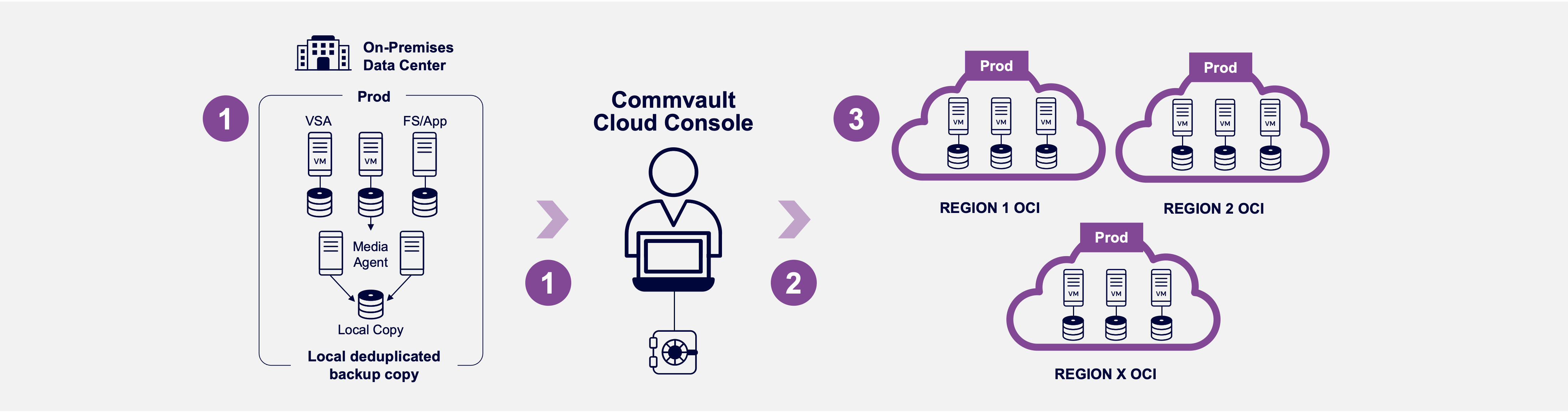
Hybrid solutions: on-premises, hybrid, cloud, archive
| Benefit | Impact |
|---|---|
| Unified management | Consolidates OCI and on-premises environments in a single console. |
| Global deduplication | Reduces storage usage by up to 35 %. |
| Fast recovery | Improved RPO and RTO in the event of an incident. |
| Policy flexibility | Retention and compliance tailored to regulatory requirements. |
| Scalability | Adds new OCI servers without reconfiguration. |
Key Takeaways from This Case
This case demonstrates how Commvault enhances Oracle Cloud environments without replacing existing infrastructure. Migrating from native backup tools to a unified solution enables companies to protect, optimize, and scale their data more intelligently.
Beyond the technology, this project reflects a clear vision: simplifying management so teams can focus on their business rather than their infrastructure.
At AT Vault, we work closely with each client to understand their processes, objectives, and operational environment. That is why every Commvault implementation is different: we adapt the architecture, retention policies, and monitoring workflows so the solution can grow with the organization.
💬 Looking to improve your Oracle Cloud backup strategy? AT Vault can help you implement scalable, secure solutions tailored to your business. 📅 Schedule a free diagnostic meeting.
Frequently Asked Questions
Why Are OCI's Native Backup Tools Not Enough?
They cover Oracle Cloud infrastructure but fall short when it comes to centralized visibility, flexible retention, and hybrid environments. When on-premises systems or other clouds are involved, organizations often end up with three consoles and no single source of truth.
Does Commvault Work with Clouds Other Than OCI?
Yes. It protects OCI, AWS, Azure, Google Cloud, Microsoft 365, and on-premises environments from the same platform—with a single retention policy and one place to test restores.
What Results Can I Expect from a Project Like This?
The results achieved in this case: lower storage costs through deduplication, faster restores, and unified visibility. The starting point is an assessment of the current environment—contact us and we will develop one for you.
El Radar, by AT Vault
Get Salesforce, Commvault and AI news before anyone else
A clear, noise-free summary of what really matters in CRM, data resilience and artificial intelligence. Straight to your inbox.
No spam. Unsubscribe anytime.